Set up your lists
Create separate lists, group items by category and drag to reorder lists, categories or items. Move items between categories when plans change.
Shopod
Keep prices and quantities beside each item. Add category discounts and see the total update as you shop.
For weekly groceries, household supplies and shopping while traveling.
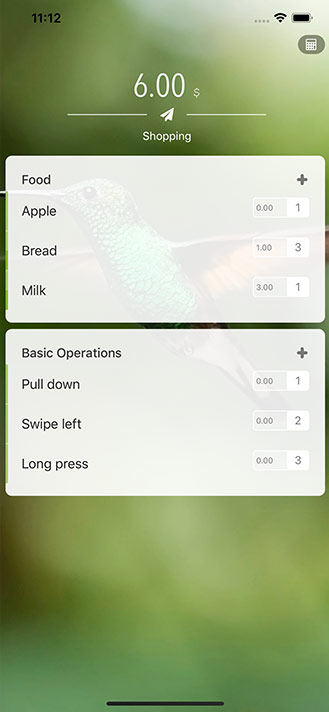
Before checkout
Shopod adds up each category after its discounts. When a rule saves money, the original total appears alongside the amount after discounts.
Illustrative prices. Checked items still count toward the total; checking them off records what you have picked up.
How it works
Create separate lists, group items by category and drag to reorder lists, categories or items. Move items between categories when plans change.
Enter the shelf price or scan it, then adjust the quantity. Item subtotals, category discounts and the list total update together.
Mark items as picked up and jump straight to a category. Change quantities without leaving the list, then reuse it by resetting a category’s quantities to zero.
Category discounts
Open a category’s discount settings to add and reorder rules. See how much each rule saves and how much more is needed to reach a spending threshold.
Pay a percentage of the category amount, such as 80% of the price for 20% off.
Take an amount off directly, or once a spending threshold is met. Spend 250 with “50 off 100” and pay 200.
Repeat the saving for each full threshold. Spend 250 with “50 off every 100” and pay 150.
While you shop
Use the camera to recognize product text. Select and combine name fragments, or confirm a price before filling it into the item.
Text scanning requires iOS 16 or later, a supported device and camera access.
Choose from ten photo and color styles. Set one background for all lists, give a list its own, or switch it back to follow the global setting.
Take a screenshot on the shopping screen to preview a full-length list image with Shopod branding, then share it using the iOS share sheet.
Language and currency
Switch between eight app languages. Pick from twelve common currency symbols or enter your own for each list; prices stay in the currency you record.
Shopod
Plan items, record prices and keep category discounts and totals in view.